
Short version: Simplified puts AI marketing agents, design, writing, video and social scheduling in one app, which makes it a strong fit for small teams juggling too many tools. The pricing and credit system take a bit of decoding, and refunds aren’t offered, so the 7-day trial is the time to test it properly. Below, I break down exactly what you get on each plan and how to get the most from the trial.
Affiliate disclosure: Brand Tool Guide is reader-supported. If you sign up for Simplified through a link on this page, we may earn a commission at no extra cost to you. It doesn't change what we say below, including the parts Simplified won't like.
If you run a small handmade shop or a product brand, you probably have a tab problem. One tab for designing the Instagram graphic, another for writing the caption, a third for scheduling it, a fourth for editing the Reel, and a fifth for the product description you were supposed to finish yesterday. Simplified is built around one promise: close most of those tabs.
This Simplified review is for anyone who has typed "Simplified review", "is Simplified worth it" or "Simplified vs Canva" into Google and wants a straight answer before handing over a card number. I went through Simplified's sales pages, its help centre, its pricing page, its refund policy, its Shopify listing and thousands of user reviews on G2 and Trustpilot to build a complete picture of what you actually get, what it costs once credits are factored in, and where it falls short.
The short version: Simplified is one of the most feature-packed all-in-one marketing apps you can buy, and its new AI agent, Riley, is a genuinely different idea from "AI that writes a caption". But the pricing is confusing, the credit system needs watching, and the no-refund policy means you should treat the 7-day trial as your only safety net.
If you want to test that workflow for yourself, you can try Simplified through this link, but use the trial as a test rather than treating the headline feature list as a guarantee.
Let's get into the detail.

Simplified Review at a Glance
- What it is: An all-in-one AI marketing app combining a graphic design editor, AI writer, browser video editor, social media scheduler and inbox, and an AI marketing agent called Riley.
- Who makes it: TLDR Technologies, Inc., a remote-first company with a US address in Walnut, California.
- Best for: Solo founders, small product brands and small agencies who would otherwise pay for three or four separate tools and want everything in one place.
- Not ideal for: Designers who need pro-level control, anyone on a tight budget who will lean heavily on AI video, and anyone who needs a refund-friendly vendor.
- Trial: A 7-day trial (shown as $1 on most pages) that converts to a paid plan automatically unless you cancel at least 24 hours before it ends.
- Pricing: Plan cards recorded in September 2026 ran from $19 a month (Pro, billed yearly) to $149 a month (Growth, billed yearly), with a newer campaign-based "Starter" plan advertised at $79 a month. More on this mess below.
- User ratings: 4.6 out of 5 from 5,010 reviews on G2; 4.6 out of 5 from 654 reviews on Trustpilot's simplified.com profile.
- Biggest strength: Breadth. Design, copy, video, scheduling, approvals and now an AI agent, all reading from the same brand kit.
- Biggest weakness: Credits and pricing clarity. The most common complaints on G2 are about running out of credits and cost.
What Is Simplified? (And Why It Looks Different in 2026)
If you looked at Simplified a couple of years ago, you'd remember it as a "Canva plus AI writer plus scheduler" type of tool. That's still in there. But the company has repositioned hard. The homepage now describes Simplified as AI agents for recurring marketing work, and the headline call to action is "Start with Riley", its AI marketing agent.
The pricing page frames it as "one app that replaces many", and literally lists the tools it wants to replace: Canva for design, ChatGPT for copy, CapCut for editing, Opus Clip for clips, Hootsuite for scheduling, n8n for workflows, Asana for project management and Linktree for your bio link. That's an ambitious list, and it tells you exactly who Simplified sees as its competition.
In practical terms, Simplified today has five layers:
- Riley and the specialist agents - you brief an AI in plain English and it produces a campaign (posts, emails, ad variants) for you to approve.
- The Brand Brain - a living brand profile that Riley builds from your website.
- The creative suite - a graphic design editor, AI image tools, an AI writer, and a browser-based video editor with AI subtitles and clipping.
- The social suite - scheduler, calendar, analytics, social inbox, link in bio and client approvals.
- The developer layer - an open-source MCP server, a command-line tool and a REST API, so other AI tools (Claude, Codex, Cursor) can use Simplified to create and publish.
For a small product business, layers 1 to 4 are what matter. Layer 5 is interesting if you're technical, but you can ignore it completely. Simplified's own FAQ says you can start with Riley in plain English and that MCP, CLI and API access are optional.
Riley, Simplified's AI Marketing Agent: What It Actually Does
Riley is the headline feature of Simplified in 2026, so it deserves the most attention in any honest Simplified AI review.
How Riley works
The idea is simple: instead of opening a design template, then a writing tool, then a scheduler, you write a brief the way you'd brief a freelancer. Simplified's own example is a brief like "promote our spring class this week on Instagram and email our list". According to Simplified, that brief comes back as the posts, the email, the creative and a publishing schedule for the week, which you then approve.
Riley acts as the lead and hands work to four specialist agents:
- Social agent - drafts platform-native posts for LinkedIn, X, Instagram and others, in your brand voice.
- Email agent - writes newsletters, nurture sequences, product updates and subject lines.
- Ad creative agent - produces ad creative and copy with A/B variants for Meta and Google.
- Copy agent - drafts blog posts, long-form articles, landing page copy and SEO briefs.
Simplified describes the full loop as six steps: brief, production, brand, approval, scheduling and reporting. After work goes live, Riley is supposed to read the numbers and tell you what landed, what stalled and what to try next week.

The part that matters most: you approve everything
For a small business owner, the scariest thing about an "AI marketing agent" is the thought of it posting something embarrassing to your Instagram at 2am. Simplified is very clear on this point. Its FAQ says review is the default: work queues as drafts, you approve or reject it, and auto-publish is opt-in. You can pause everything from the app, from Slack or from the command line. The Riley page also says it asks for sign-off before a campaign publishes or before ad spend starts.
That's the right design. An agent that waits for your yes is a productivity tool. An agent that doesn't is a liability.
What "a campaign" means on the new plans
Simplified's newer pricing copy is built around "campaigns". One campaign is one brief-to-approval cycle, and each campaign credit produces one output type:
- a social batch of 6 posts, or
- an email sequence of 3 to 5 emails, or
- a paid ad creative set of 3 A/B variants for Meta or Google.
So a brief that asks for social posts AND an email AND ads would use more than one campaign. Unused campaigns don't roll over to next month, and extra campaigns are $10 each on any plan. Simplified also says every plan still includes the design, video, writing and scheduling tools on their own, so Riley is additional rather than a replacement for doing things manually.
My honest take on Riley
Riley is the most interesting thing Simplified has built, because it attacks the real problem small businesses have. Most of us don't lack ideas or tools; we lack the hours to turn an idea into six on-brand posts, an email and an ad, then schedule all of it. If Riley gets you 80% of the way there and you edit the last 20%, that's a real time saving.
But keep your expectations grounded. On G2, "AI limitations" is the third most common complaint, with 346 mentions, and one reviewer specifically noted the AI can struggle with very detailed or nuanced instructions. Trustpilot's own summary of recent Simplified reviews mentions that some AI features produce awkward results or don't match prompts accurately. Treat Riley as a fast first-draft team, not a finished marketing department.
The Brand Brain: Simplified's Smartest Feature for Small Brands
If you've ever used an AI tool and spent the first ten minutes of every session re-explaining your brand voice, you'll understand why the Brand Brain exists.
You paste in your website URL, and Riley drafts a brand profile with six sections:
- Visual identity - your colour palette (pulled from your site and grouped), fonts and logo lockups. In Simplified's own demo, it pulled 15 colours in four groups from a single homepage.
- Imagery - photography direction in plain language: what to show, what to avoid.
- Rules - hard constraints every agent checks before anything goes out, such as "never show competitor logos". You add your own in a sentence.
- Content strategy - your content pillars and how they map across your channels.
- Ideal customers - your customer segments and what they need.
- Context - a living log that Riley fills with a Daily Audit, a Daily Team Digest and a Weekly Performance Report.
Every section is plain text you can edit, and Simplified recommends reading the Rules section closely because those are the lines the agents won't cross. If you run more than one brand (or you're an agency), each workspace gets its own Brand Brain, and Simplified says nothing from one client leaks into another.
Why this matters for a handmade or product business: your brand is often your biggest asset. If your candles are "slow, cosy, hand-poured in small batches", you don't want an AI writing "SHOP NOW!!! LIMITED DEAL!!!" captions. A rules section you control is exactly the safeguard you need. Just be sure to check what Riley writes from your site, because it's working from whatever your website currently says.

Simplified Graphic Design Editor Review
Underneath the agent layer, Simplified still has a full drag-and-drop design editor, and for many users it's still the thing they use most.
What's included, according to Simplified's design pages:
- Templates for social posts, stories, ads, thumbnails, flyers, business cards, banners, letterheads and more, or start from a blank canvas.
- Brand kits that store your colours, fonts and logos.
- One-click quick tools: crop, resize for different platforms, background removal, upscaling, image expansion and colour palette adjustments.
- Intro and outro animations for design elements.
- A stock library.
- AI tools: an AI image generator, AI ads generator, thumbnail maker, sketch-to-image, generative fill, logo maker, mockup generator, collage maker and a batch photo editor.
- Real-time collaboration, comments and task assignment for teams.
For product businesses, the useful combination is background removal plus resize plus brand kit. Shoot your product on the kitchen table, remove the background, drop it on an on-brand template, and resize the same design for Instagram, Pinterest and Facebook. That's the bread-and-butter workflow, and Simplified covers it.

Where the design editor falls short
The honest comparison here is Canva. Canva lists a stock library of more than 141 million photos and graphics, and it's rated 4.7 on G2 from over 7,700 reviews. Simplified doesn't publish a current template or stock count that I could verify, and design-focused users consistently find Canva's library larger and its editor more polished.
There are also negative reports worth knowing about. On Simplified's older Trustpilot profile, one user wrote that edits to text and shapes didn't match the preview when the design was rendered, and said the platform was fine as a scheduling calendar but frustrating for design and video. That review dates from 2024, so it may not reflect the current editor, but it's a reason to test-export a few designs during your trial rather than assume.
Simplified AI Writer Review
Simplified's AI writer is one of its oldest features, and in 2026 it's pitched as the writer that "writes, designs and publishes".
Key features from Simplified's AI writer page:
- 50+ templates for blog posts, Facebook and Google ads, product descriptions, email newsletters, YouTube descriptions, press releases, website copy and more.
- A Knowledge Base for brand voice. You upload brand guidelines, sample content or a style guide, and the AI uses it for future outputs. Simplified says setup takes about ten minutes.
- 20+ languages, including Spanish, French, German, Portuguese, Italian, Dutch, Japanese, Chinese and Korean.
- Long-form article generation with outlines and H2 sections.
- One-click publishing to WordPress, with heading structure, meta fields and Yoast SEO compatibility.
- One-click publishing to Shopify, including product descriptions, collection copy and store blog posts, with bulk product description generation.
That Shopify piece is the standout for product sellers. Writing 40 product descriptions is the kind of job that sits on a to-do list for months. Generating first drafts in bulk and pushing them to your store from one place is a real time saver, provided you edit each one so it sounds like you and is accurate about materials, sizes and care instructions.
The honest limitations
Simplified itself admits that for dedicated SEO scoring and keyword density analysis you should pair it with your existing SEO tools. So don't expect it to replace a proper SEO tool.
Credits matter here too. Plain AI writing is cheap at 1 credit per 100 words, but generating a full AI blog post costs 1,750 credits per article generation, according to Simplified's help centre. On a 10,000-credit plan, that's only five or so full AI blog posts if you used credits for nothing else. Writing captions and product descriptions is cheap; generating whole articles is not.

Simplified Video Editor Review
Video is where most small brands feel the pressure, and Simplified's video suite is broad.
The browser-based video editor runs without any download and saves as you work. Simplified says it has four AI tools built into the editor:
- AI Subtitles - transcribes your audio, times the captions, and lets you style them with your saved brand fonts and colours. You can edit any line.
- AI Video Generator - creates video from text.
- AI Short Repurpose - scans a longer upload and pulls out shorter clips for TikTok, Reels and Shorts.
- Text to Speech - adds AI voiceover.
There are also 20+ presets and transitions, and you can publish or schedule straight from the editor to Instagram, TikTok, YouTube, LinkedIn, Facebook and Pinterest. Beyond the editor, the wider video suite includes a video background remover, AI video translator, audio enhancer, voice cloning, GIF maker and compressor, and Simplified mentions 90+ AI actors for product videos.
One thing to note: Simplified says watermark inclusion depends on your plan, so confirm your exports are watermark-free before you commit.
Video is where credits disappear fastest
This is the single most important thing to understand about Simplified's video tools. According to the help centre:
- A 60-second text-to-video costs a minimum of about 1,505 credits, and Simplified notes it can go higher if you use AI to enhance the script or make the video longer.
- A UGC-style video starts at 1,750 credits.
- Repurposing clips costs 500 credits per 10-minute upload.
- AI subtitles cost 60 credits per minute, and text-to-speech 120 credits per minute.
On the 10,000-credit Pro plan, that means roughly six one-minute AI-generated videos a month if you spent your whole allowance on them. Subtitles and clipping your own footage are far more affordable. My advice for product businesses: film real footage of your products (which tends to perform better anyway) and use Simplified for subtitles, resizing and clipping rather than generating whole videos from text.
User feedback on video is mixed. Trustpilot's summary notes some people find video creation less user-friendly, and older Trustpilot complaints describe slow AI video generation and text-to-video jobs that didn't complete. Others on Trustpilot praise the subtitle tool for being quick and accurate. Test video during your trial with the kind of clip you'd actually post.

Simplified Social Media Scheduler Review
If there's one part of Simplified that even critics tend to agree works, it's the scheduler. One of the harshest Trustpilot reviews of the platform still said it was good for scheduling.
What the scheduler covers:
- Networks: Instagram, TikTok, X, LinkedIn, Facebook, YouTube, Pinterest, Threads and Google Business.
- Native formats: Reels, Stories, carousels, Shorts, threads and Pins publish in their native shape rather than as a cross-post compromise.
- Volume: Simplified says you can schedule up to 10,000 posts.
- Timing: set an exact date and time, or drop posts into queue slots per account.
- Approvals: drafts can hold in review until a client or account owner signs off.
- Reporting: engagement and growth per account.
- Extras: a social inbox for comments and DMs, link in bio, Facebook group and story scheduling, comment scheduling and bulk scheduling.
For a small product brand, the combination of Pinterest, Instagram and Google Business in one calendar is particularly useful, because those three often drive real buying traffic for handmade and local businesses.

Scheduler watch-outs
- Social account limits depend on your plan. The plan cards recorded in September 2026 showed 7 accounts on Pro, 15 on Business and 30 on Growth, with extra accounts at $5 a month each.
- Bulk scheduling and the external client approval workflow were sold as $19-a-month add-ons on Pro (billed yearly) in that same September check. If you need both, Business may work out cheaper than Pro plus add-ons.
- Posting to X can use credits. Simplified's credit table lists 25 credits per published X post without a link and 250 credits per X post with a link. If X is a major channel for you, factor that in.
- If you're on the free plan, one Trustpilot reviewer complained in early 2025 that scheduling was capped at ten posts, which made it far less useful.
Simplified Pricing 2026: Plans, Credits and the Confusing Bits
This is the section most people searching "Simplified pricing" really want, and it's also the messiest part of this review, because Simplified's own pages don't agree with each other.
Before you choose a plan, check Simplified's current pricing here, because the plan structure and campaign limits may change.
The plan cards (Pro, Business, Growth)
An independent read of Simplified's pricing page on 25 September 2026 recorded these plans (published by Adapter.to, which is a competing tool, so I've only used the numbers they read off Simplified's page):
| Plan | Monthly billing | Yearly billing (per month) | Social accounts | Seats | AI credits/month | Storage |
|---|---|---|---|---|---|---|
| Pro | $29 | $19 | 7 | 1 (no extra seats) | 10,000 | 5 GB |
| Business | $79 | $49 | 15 | 3 | 30,000 | 50 GB |
| Growth (agency tab) | $199 | $149 | 30 | 5 | 100,000 | 1 TB |
| Enterprise | Quote | Quote | Custom | 10 | Custom | Custom |
According to that same read:
- Pro includes one brand style and voice, one AI agent, scheduling, planner and calendar, analytics and the unified inbox.
- Business adds two brand styles, five AI agents, AI workflows, API access, collaboration, Instagram product tagging and priority AI processing.
- Growth adds five brand styles, ten AI agents, bulk post importing, advanced analytics, shared calendars and priority support. It only appears under an "I'm an Agency" tab, so many visitors never see it.
- Pro is strictly one person. Extra seats can't be added; Business and Growth take extra users at $10 a month each.
The yearly discount varies a lot by plan: about 34.5% on Pro, 38% on Business, but only about 25% on Growth.
The campaign plan (Starter at $79)
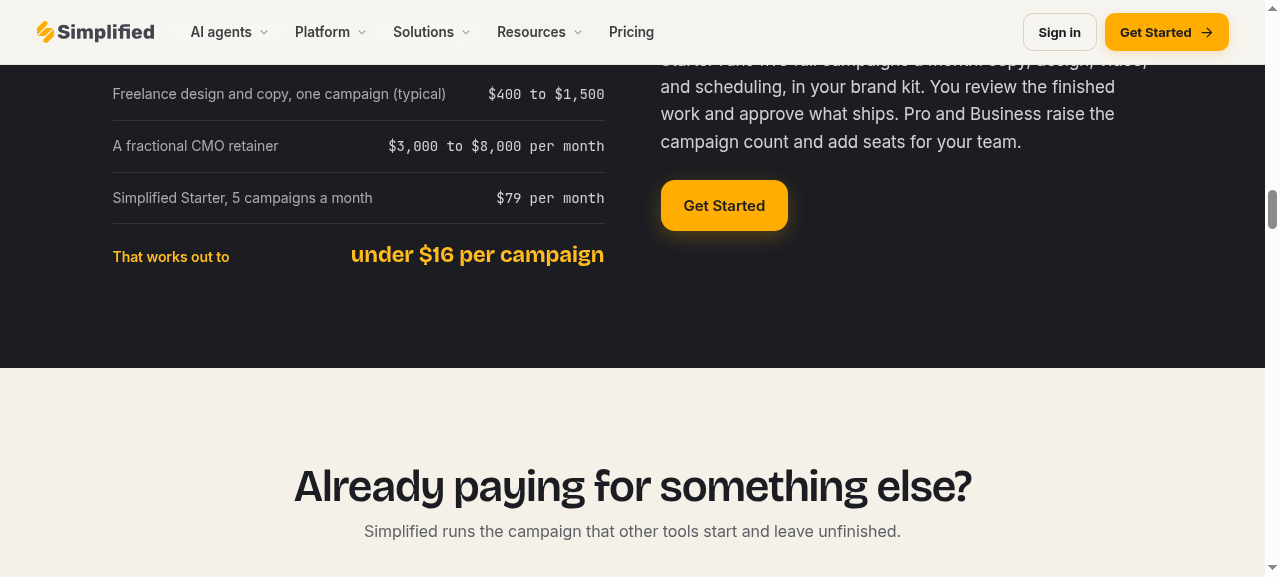
When I checked Simplified's pricing page on 22 October 2026, the page copy led with something different: Simplified Starter from $79 a month, which includes 5 campaigns a month, 100K AI words and 100 AI designs (and, according to the page's structured data, 50 AI videos, 7 social accounts, 5 GB of storage and 1 brand kit). The page says Pro and Business raise the campaign count and add seats, and extra campaigns are $10 each.
And the other prices floating around
- G2's pricing panel lists Simplified One from $29, Business from $79 and Growth from $119.
- Simplified's AI writer page says it starts at $20 a month.
- The Shopify App Store listing shows plans from $15 to $125 a month.
That's at least four different price stories for the same product. I don't think anything sinister is going on: it looks like a company mid-way through a pricing change. But it means you must check the exact plan, price, credits and seats on the checkout screen before you pay, and screenshot it for your records.
How Simplified's credits work
Every AI action draws from one shared pool of credits (Simplified calls it the Unified Credit System). Your balance shows under Settings > Usage, credits renew monthly, and Simplified says the product shows the credit cost before you generate.
Here's what the main actions cost, from Simplified's help centre:
| Action | Credits |
|---|---|
| AI writing | 1 per 100 words |
| Text-only social post | 1 |
| AI carousel | 10 |
| Presentation slide | 10 |
| AI subtitles | 60 per minute |
| Social post with AI image | 60-80 |
| AI image | 60-100 (depends on model) |
| Text to speech | 120 per minute |
| Repurpose clips | 500 per 10-minute upload |
| Text-to-video | about 1,505 minimum per 60 seconds |
| AI blog post | 1,750 per generation |
| UGC-style video | 1,750 minimum |
| X post | 25 without link, 250 with link |
Simplified's own estimate is that 10,000 credits gets you roughly 100 to 166 AI images, or about 166 minutes of subtitles, or around 125 to 166 social posts with AI images, if you spent all of them on that one thing.
Put simply: text is cheap, images are moderate, and AI video is expensive. That explains why "limited credits" (437 mentions) and "insufficient credits" (321 mentions) are two of the top five complaints on G2.
Add-ons to budget for
From the September 2026 pricing read:
- Extra social account: $5/month (any plan)
- Extra user: $10/month (Business and Growth only)
- Extra AI brandbook: $35/month each
- Bulk post scheduling: $19/month billed yearly (Pro add-on)
- External client approval workflow: $19/month billed yearly (Pro add-on)
- Extra campaigns: $10 each (from the current pricing page)
Is there a Simplified free plan?
It's complicated. The refund policy still refers to a "Free Forever" plan, and says that when you cancel a paid plan your workspace drops back to it at the end of the billing cycle. But the September 2026 pricing read found no free plan shown on the pricing page, only a 7-day trial on Pro and Business that costs $1 to start. G2 reviewers who used the free tier complain that its limits are low. Simplified also offers a big collection of free single-purpose web tools (image resizer, caption generator, background blur and so on), which are separate from the subscription.
Simplified Refund Policy and Free Trial: Read This Before You Sign Up
This is the most important section of this Simplified review for your wallet.
Simplified's refund policy (dated April 2026) is blunt: it does not offer refunds. Monthly and annual subscriptions are non-refundable, including unused credits and downgrades. Here are the details that catch people out:
- The trial auto-converts. A $1 or $0 trial becomes a paid subscription at the end of 7 days. You must cancel at least 24 hours before the trial ends to avoid being charged.
- Trial charges aren't refunded. If you forget, the charge is considered correct.
- You must cancel in the right place. Cancellation is done under Profile > Billing. Deleting the app, deleting your data or simply not logging in does not cancel your subscription.
- Bad AI output isn't grounds for a refund. Simplified says it will help with prompts via live chat instead.
- Technical failures have a 24-hour window. A refund may be considered for a verified technical issue only if it was reported, and the payment made, within the last 24 hours.
- Add-on credit packs are non-refundable. If a generation fails and credits were taken, Simplified can restore the credits to your account, but not the money.
- Chargebacks lock your account. If you dispute a charge with your bank, Simplified says your workspace is locked and suspended immediately.
The good news: after you cancel a paid plan, you keep full access until the end of the billing cycle. There's also an option to pause a subscription, and plan changes are flexible (upgrades apply immediately, downgrades at the next billing period, with no cancellation fees).
What real users say about billing
On Simplified's older Trustpilot profile (simplified.co, rated 1.7 from 47 reviews), several complaints focus on billing: a user charged $216 on an annual renewal without an email reminder (2025), another who couldn't log in to cancel and got no reply from support (January 2026), and others who felt credit-policy changes increased costs. That profile has had only two reviews in the last 12 months, and the main simplified.com profile is rated 4.6 from 654 reviews, so these are a minority. But they are consistent with how the refund policy is written.
My practical advice:
- Set a phone reminder for day 5 of your trial.
- Decide by day 6 whether you're keeping it.
- If you go yearly, put the renewal date in your calendar with a reminder two weeks before.
- Take a screenshot of the plan and price you agreed to at checkout.
What Real Users Say: Simplified Reviews on G2 and Trustpilot
Ratings are only useful if you know what's behind them, so here's the fuller picture.
G2: 4.6 out of 5 from 5,010 reviews
G2's summary of what people like is dominated by ease of use. "Easy to use" is mentioned 1,457 times, followed by praise for writing help (1,138 mentions), content creation (792) and time-saving features (730).
The complaints are remarkably consistent, and almost all are about money and credits:
- Limited credits - 437 mentions
- Credit system / not free - 361 mentions
- AI limitations - 346 mentions
- Insufficient credits (including requests timing out and slow support) - 321 mentions
- Expensive - 301 mentions

Trustpilot: two very different profiles
- simplified.com: 4.6 "Excellent" from 654 reviews, with 80% five-star and 3% one-star. Trustpilot's AI summary says people like the ease of use and the AI tools for captions and videos, while some mention awkward AI results, slowness, not enough free credits and a less friendly video creation experience. Trustpilot also flags that Simplified hasn't recently invited customers to review and hasn't replied to negative reviews. Many recent five-star reviews are one-liners, so I'd weight the detailed reviews more heavily.
- simplified.co (older profile): 1.7 "Bad" from 47 reviews, mostly older, with complaints about billing, support response times and output quality.
Shopify App Store
The "Simplified AI Marketer" Shopify app has been listed since September 2022 but had zero reviews when I checked. That's not a red flag on its own, but it means there's no Shopify-specific social proof yet. The app also requests broad store permissions (including editing products, discounts and online store pages), which is normal for a tool that publishes descriptions, but worth understanding before you install.
A note on Simplified's user numbers
Simplified's pages variously claim 15 million+ users, 10 million+ and, in the G2 seller description, over 2 million. They're likely from different points in time, but I'd ignore user counts and focus on whether the product fits your workflow.
Simplified Pros and Cons
Pros
- Genuine all-in-one: design, writing, video, scheduling, inbox, approvals and an AI agent in one login.
- Riley is a real step beyond "AI writes a caption": brief once, get posts, email and ads back for approval.
- Approval is the default; nothing auto-publishes unless you turn it on.
- The Brand Brain builds your brand profile from your website and enforces rules you set.
- Strong scheduler covering Instagram, TikTok, Pinterest, Threads, Google Business and more, with native formats.
- Direct publishing to Shopify and WordPress from the AI writer, including bulk product descriptions.
- Video suite covers subtitles, clipping, translation and voiceover in the browser.
- You keep everything you create, even if you cancel.
- Consistently praised for ease of use (1,457 G2 mentions).
Cons
- Pricing is confusing, with different numbers on the pricing page, G2, the AI writer page and Shopify.
- Shared credit pool runs out fast if you use AI video or full AI blog posts.
- Strict no-refund policy; 7-day trial auto-converts unless cancelled 24+ hours before it ends.
- Pro plan is one seat only; collaboration means Business or above.
- AI output can miss nuanced instructions, according to user reviews.
- Design library and editor polish aren't on Canva's level for design-heavy users.
- Some historical complaints about support response times and billing.
- No independent SEO scoring in the AI writer.
Simplified vs Canva, Adobe Express and Other Alternatives
You can't judge whether Simplified is worth it without looking at what else you could pay for. Here's how it stacks up against the competitors small businesses most often consider. Prices change constantly, so treat these as a snapshot from 2026 and check each vendor's page.
| Tool | Starting paid price (2026) | Best at | What it lacks vs Simplified |
|---|---|---|---|
| Simplified | Pro $19/mo yearly ($29 monthly) per Sept 2026 read; Starter campaign plan $79/mo | All-in-one with AI agent | (baseline) |
| Canva | Pro $144/year (about $12/mo) or $18/mo | Design and templates | No AI agent that runs full campaigns |
| Adobe Express | Premium $9.99/mo | Cheap, polished design plus Adobe Stock | Limited scheduling (3 accounts per network) |
| VistaCreate | Pro $10/mo yearly ($13 monthly) | Budget design with a big template library | Fewer AI tools; fewer networks |
| Visme | Starter $12.25/user/mo yearly ($29 monthly) | Presentations, infographics, data visuals | Not built around social scheduling |
| Predis.ai | From about $19/mo | AI-generated social posts and ads | Narrower design and video editing |
| Ocoya | Starter $29/mo (new Sept 2026 lineup) | AI social content plus scheduling | Lighter design and video suite |
| Designs.ai | From about $19/mo | AI logo, video and mockup generators | No agent workflow; less scheduling |
| Creatopy (now The Brief) | Roughly $29-$39/mo | Ad creative and banner production at scale | Not a general social and content suite |
Simplified vs Canva
This is the comparison most people search for, so let's be direct. Canva Pro costs $144 a year (or $18 a month), and Canva Business is $250 per person per year. In Europe, Canva Pro is listed at EUR 110 a year. Canva has a larger stock library (141M+ assets), a higher G2 rating (4.7 from 7,700+ reviews), and a more polished editor.
Where Simplified wins is everything around the design: a stronger built-in scheduler and inbox, client approvals, direct Shopify and WordPress publishing, a video suite, and Riley turning a brief into a whole campaign. Note also that adding a second person to Canva moves you onto per-person Business pricing, whereas Simplified's Business plan includes three seats.
Choose Canva if design quality and templates are your top priority and you're happy to use a separate scheduler. Choose Simplified if you want one tool to handle design, copy, video and publishing, and you value the time saved more than pixel-perfect design.
Simplified vs Adobe Express
Adobe Express Premium is $9.99 a month and includes 250 generative AI credits a month, all premium templates, 200M+ Adobe Stock assets, 30,000+ Adobe Fonts, one-click resize, video background removal and 100 GB of storage. It can schedule to three accounts per social network.
It's cheaper and arguably more polished for pure design. Simplified offers far more on the workflow side: a proper scheduler with inbox and approvals, an AI agent, AI writing with store publishing, and a broader video toolkit.
Simplified vs VistaCreate
VistaCreate (made by Vista) has a free plan and a Pro plan at about $10 a month billed yearly. It's a strong budget design tool with direct posting to Facebook, Instagram and Pinterest. One Capterra reviewer noted it has fewer AI tools than competitors. If all you need is attractive graphics on a budget, VistaCreate is hard to beat; if you want AI copy, video and multi-network scheduling, Simplified does much more.
Simplified vs Visme
Visme starts at $12.25 per user per month billed yearly ($29 monthly), and Pro is $24.75 yearly ($59 monthly). Around 70% of Visme's GetApp reviewers use it for presentations, which tells you where its strength lies: presentations, infographics and data-heavy visuals. It's not the natural pick for daily social media marketing, which is Simplified's home ground.
Simplified vs Predis.ai and Ocoya
These two are Simplified's closest rivals on AI social content. Predis.ai starts from about $19 a month and focuses on generating social posts and ads from a prompt, though one Capterra reviewer said images can look obviously AI-generated and are hard to edit. Ocoya changed its pricing in September 2026, replacing its old $15 entry plan with a $29 Starter plan. Both are worth a look if all you want is AI-generated social posts plus scheduling; Simplified offers a wider design and video suite and the agent workflow.
Simplified vs Designs.ai and Creatopy (The Brief)
Designs.ai bundles an AI logo maker, video maker, mockup generator, social designer and voiceover tool from around $19 a month, and is particularly useful when you're building a brand from scratch. Creatopy has rebranded as The Brief and focuses on ad creative production, with paid plans reported at roughly $29 to $39 a month. Both are more specialised than Simplified.
Who Should Use Simplified (and Who Shouldn't)
Simplified is a good fit if you are:
- A solo founder or small product brand currently paying for a design tool, an AI writer and a scheduler separately.
- A Shopify or WordPress seller who wants to generate and publish product descriptions and blog posts without copy-pasting.
- Someone who posts across Instagram, Pinterest, TikTok, Facebook and Google Business and wants one calendar.
- A small agency or freelancer managing a few client brands who needs separate workspaces, Brand Brains and approval flows.
- Short on time rather than ideas, and happy to edit AI first drafts rather than write from scratch.
Simplified probably isn't for you if you are:
- A designer or design-led brand who needs the biggest template library and finest control (look at Canva or Adobe Express).
- Planning to rely heavily on AI-generated video, unless you're on a higher plan with a big credit allowance.
- Wanting a forgiving refund policy or monthly flexibility without paying attention to renewal dates.
- On a very tight budget and only need graphics (VistaCreate or Adobe Express will cost less).
How to Get the Most From Your Simplified Trial
Because the trial is effectively your only refund window, plan it like a mini-project:
- Day 1: Build your Brand Brain. Paste your website URL, then edit the Rules and Ideal Customers sections so they sound like you.
- Day 1: Connect the two or three social accounts you actually use.
- Day 2: Give Riley one real brief, such as a new product launch or a weekly content plan. Judge how much editing the output needs.
- Day 3: Make three graphics in the design editor from your own product photos using background removal and resize. Export them and check quality.
- Day 4: Test the AI writer on five real product descriptions. If you're on Shopify, test publishing one.
- Day 4: Upload one of your own short videos and generate subtitles. Note how many credits it used.
- Day 5: Schedule a week of posts and check they publish correctly.
- Day 5: Look at Settings > Usage to see how many credits you used, and work out whether your plan's allowance covers a normal month.
- Day 6: Decide. If it's not for you, cancel under Profile > Billing and keep the confirmation.
Simplified Review FAQ
Is Simplified legit?
Yes. Simplified is made by TLDR Technologies, Inc., has 5,010 reviews on G2 with an average of 4.6 out of 5, and publishes a detailed help centre with hundreds of articles. Like any subscription tool, read the refund terms carefully, because they are strict.
Is Simplified worth it in 2026?
It's worth it if you'd otherwise pay for several separate tools and you'll use the scheduler, writer and design tools regularly. It's less good value if you mainly need one thing done well, or if you'll burn through credits on AI video.
How much does Simplified cost?
Plan cards recorded in September 2026 showed Pro at $29 a month or $19 billed yearly, Business at $79 or $49, and Growth at $199 or $149. The pricing page in October 2026 also advertises a campaign-based Starter plan from $79 a month. Always confirm the exact plan at checkout.
Does Simplified have a free trial?
Yes, a 7-day trial, usually $1 to start, which converts to a paid plan automatically. Cancel at least 24 hours before it ends if you don't want to continue.
Does Simplified offer refunds?
No, as a rule. Subscriptions, trial conversions, unused credits and add-on credit packs are non-refundable. A refund may be considered for a verified technical failure reported within 24 hours of payment.
What is Riley in Simplified?
Riley is Simplified's AI marketing agent. You give it a plain-English brief and it plans the campaign, hands work to specialist agents for social posts, email, ad creative and long-form copy, applies your brand, and brings it back for your approval before scheduling.
How do Simplified credits work?
All AI features draw from one monthly credit pool that renews each month: 10,000 on Pro, 30,000 on Business and 100,000 on Growth. Writing is cheap (1 credit per 100 words), images cost 60 to 100 credits, and a 60-second AI video starts around 1,505 credits.
Is Simplified better than Canva?
For pure design, Canva is stronger and cheaper. For an all-in-one workflow covering design, copy, video, scheduling and approvals, with an AI agent on top, Simplified offers more in one place.
Does Simplified work with Shopify?
Yes. The AI writer can publish product descriptions, collection copy and blog posts directly to Shopify, and there's a Simplified AI Marketer app in the Shopify App Store.
Which social networks does Simplified support?
Instagram, TikTok, X, LinkedIn, Facebook, YouTube, Pinterest, Threads and Google Business.
Will Simplified's AI post without my permission?
Not by default. Work queues as drafts for your approval, and auto-publish is an opt-in setting you can pause at any time.
Do I own what I create in Simplified?
Yes. Simplified says copy, designs, video, captions and campaign assets belong to your account and you keep them even if you cancel.
Final Verdict: Should You Try Simplified?
After going through everything Simplified publishes about itself and what thousands of users say about it, here's my honest conclusion.
Simplified is one of the most complete marketing toolkits a small business can buy. Most tools in this space do one job: Canva designs, Buffer schedules, ChatGPT writes. Simplified does all of it in one place, and with Riley and the Brand Brain, it's now trying to do the joining-up work that usually falls to you at 11pm. For a small product brand without a marketing team, that's exactly the right problem to be solving.
The catches are real, though. The pricing is harder to read than it should be, the credit system punishes heavy AI video use, and the no-refund policy leaves no room for forgetting to cancel. None of these are deal-breakers if you go in with your eyes open, but all of them are reasons to use the trial properly rather than casually.
If you're juggling three or four marketing tools and losing hours moving content between them, Simplified is well worth a structured 7-day test. Build your Brand Brain, give Riley one real brief, schedule a real week of posts, and check your credit usage before day six. You'll know quickly whether it gives you hours back.
👉 Try Simplified and brief Riley on your next product launch
(Set a reminder for day 5 of your trial. If it's not saving you time by then, cancel under Profile > Billing and you'll have lost nothing but a dollar.)
Keep going
Software / Practical guide
PageFly Review 2026: What the Shopify Page Builder Actually Gives You (and Where It Falls Short)
An honest PageFly review for Shopify merchants covering the free plan, AI features, A/B testing, true pricing, the uninstall catch and alternatives.
Software / Practical guide
Moosend Review 2026: Is This Budget Email Platform Actually Good for a Small Business?
An in-depth Moosend review for small businesses covering 2026 pricing, automation, deliverability, the Shopify gap and how it compares with Mailchimp, MailerLite and Brevo.
Software / Practical guide
Write an Email Platform Brief Before Comparing Plans: List the Emails You Actually Send, Then Judge Every Tool Against That
Pricing tables tell you what every platform can do. They can't tell you what your business needs to send. Spend an hour writing a one-page brief first, test one real route on your current tool, and comparing platforms becomes quick, fair and much harder to get wrong.