

Short version
- Most customers would happily share a photo. Nobody asked them at the right moment.
- The best time to ask is when the product is being used, not when it's just arrived.
- Make it one step: reply to an email with a photo. No forms, no apps.
- Always get clear permission before you use a photo, and ask how they'd like to be credited.
- Customer photos are most useful for answering doubts, not just for looking nice.
If you've ever wondered how to get customer photos for your shop, you've probably tried the obvious thing. A line at the bottom of an email says, "Share a photo and tag us!" Maybe there's a card in the parcel with your social media handle.
And then almost nothing comes back.
It's easy to take that as a sign that customers don't care, or that your products aren't the kind people photograph. Usually neither is true.
People photograph things they love all the time: their dog in its new collar, their kitchen with the new bowl, their child in the new jumper.
They just don't send those photos to you.
This guide is about closing that gap. You'll see why the usual request fails, when to ask, how to make it easy and how to get clear permission.
You'll also see how to pick the right photos and put them where buyers need them. That's what turns a nice gallery into something that actually helps people decide.
Why "tag us" rarely brings in customer photos
A "tag us" request asks people to do several things at once.
They need to take a photo, open a social app and make a post. Then they need to find your account, tag it correctly and be happy to share that photo with all their friends and followers.
Each step loses people, and the last one loses the most. Plenty of people are happy to share a photo with you privately. They just don't want their living room, their children or their face on a public account.
There's also a timing problem. "Tag us" usually appears in the order confirmation or in the parcel.
That's before the customer has used the product. There's nothing to photograph yet except a box.
So the usual approach asks for too much, from too few people, at the wrong time. No wonder it brings in so little.
Meet Kittiwake Robes and the swimmers who never sent a photo
This is an illustrative example.
Kittiwake Robes is a small business run by Áine. She makes changing robes for sea swimmers: long, warm, hooded robes in waxed cotton with a fleece lining, made in small batches.
Her customers are a sociable bunch. They swim in groups, at sunrise, all year round, and they take photos at the beach constantly.
Áine could see them on social media, sometimes wearing her robes. But they almost never tagged her.
Her product pages had studio photos of the robes on a hanger and on a model in front of a white wall. They were fine, but they didn't show what buyers really wanted to see.
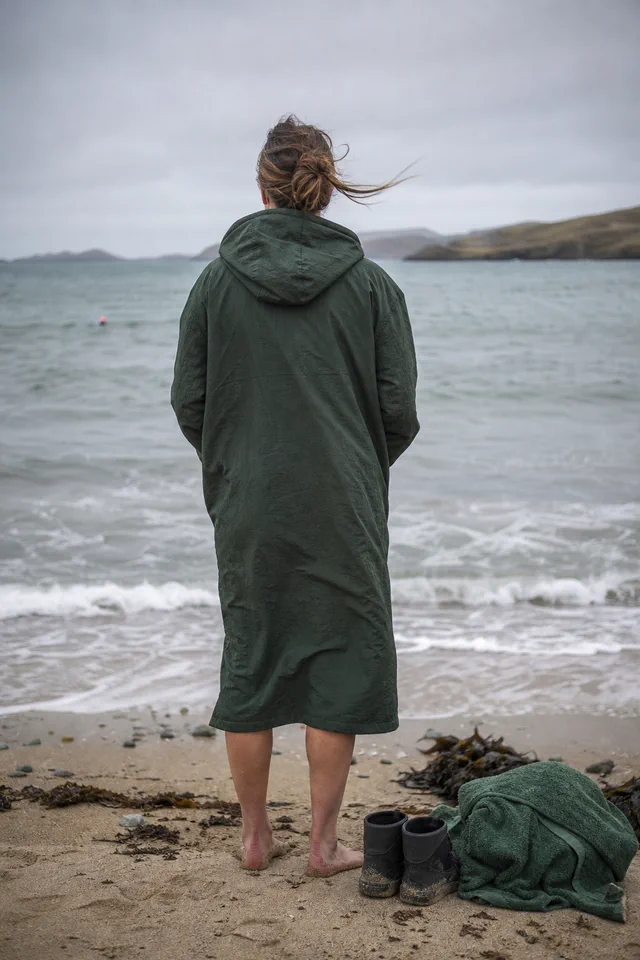
Buyers wanted real people at a cold, windy beach, wrapped up after a swim.
She tried a "tag us" card in every parcel for a year. She got four photos.
Then she changed when and how she asked. Over the next six months, she had more than eighty. The rest of this guide walks through what she changed and how you can do the same.
Ask when the product is in use, not when it arrives
The first change was timing.
Instead of asking in the parcel, Áine sent a short email about three weeks after delivery. By then, most customers had worn the robe several times and been to the beach.
In other words, they already had photos on their phones.
That timing changes the whole request. You're not asking someone to go and take a photo. You're asking them to share one they probably already have.
Every product has a moment when it's most "in use". Work out roughly when that is for yours.
| Type of product | When it's likely to be in use | When to ask |
|---|---|---|
| Clothing and accessories | After a few wears | 2 to 4 weeks after delivery |
| Homeware | Once it's found its place | 2 to 3 weeks after delivery |
| Plants and garden items | Once they've settled or grown | 4 to 8 weeks after delivery |
| Gifts | After the gift has been given | Ask about the occasion, or later than usual |
| Food and drink | Quickly | Within a week or two |
These are rough guides, not rules. Use what you know about how people use your products.
If you're not sure, look at when customers tend to email you with questions or comments. That's often a sign the product has become part of their day.
Try one timing for a month, then try a slightly later one. Keep whichever brings back more replies.
Make sharing one step: reply with a photo
The second change was making it easy.
Áine's email didn't ask people to post anything. It asked them to reply to the email with a photo.
That's something almost everyone knows how to do on a phone, in a few seconds. Here's the email she sent.
Subject: Has your robe been to the beach yet?
Hi,
Your Kittiwake robe has been with you for a few weeks now, so I hope it's been keeping you warm after some cold swims.
I'd love to see it in action. If you have a photo of you (or just the robe) at the beach, would you reply to this email with it? It doesn't need to be a good photo.
Windswept and soggy is perfect.
If you're happy for me to share it on my website or social media, just say so in your reply. Tell me how you'd like to be credited: first name, initials, or not at all.
If you'd rather I kept it to myself, that's completely fine too. I just love seeing them.
Áine
Look at a few small choices in that email.
The subject line asks a friendly question that's easy to answer. It sounds like a person, not a marketing team.
The email asks for one simple action: reply. There's no form, no app and no account to find.
And it separates two choices: sharing the photo with Áine, and letting her use it in public. Splitting them made people much more willing to reply.
When you write your own version, keep it short and sign it with a real name. Send it from an address that people can reply to, and make sure someone reads the replies.
Tell customers any photo is good enough
This is a surprisingly big deal. Lots of customers hold back because they assume you only want polished, beautiful photos.
They think their slightly blurry beach snap won't do. So they send nothing.
But on product pages, slightly imperfect real photos are often more convincing than perfect ones. They look like real life, and that's the point.
Say this clearly when you ask, with phrases like "Any photo is great", "Blurry is fine" or "It doesn't need to be fancy".
These little phrases do a lot of work. Áine's line, "Windswept and soggy is perfect", became something customers mentioned in their replies. Several said it was what made them send a photo.
One more point here. Never pass off staged shots or computer-made images as customer photos. Real customer photos only help because buyers can trust they're real.
Ask questions that lead to useful photos
You can gently guide what kind of photos people send, without being pushy.
Instead of "Send us a photo", try a question that leads to a useful one:
- "Where's your robe been so far?"
- "What does your bowl look like on your table?"
- "Where did you hang your print?"
- "What's in your bag on a normal day?"
These questions invite photos of the product in real use. That's exactly what new buyers want to see.
Áine sometimes adds: "If you're happy to tell me your height, that helps other people choose a size." Many customers include it, and it makes the photo far more useful.
Think about the one detail that would help your next buyer most. It might be height, room size, the type of dog or how a colour looks in daylight. Ask for that detail politely, and make it optional.
Get clear permission and keep a record
This part matters a lot for trust.
When someone sends you a photo, it's best not to assume you can use it anywhere you like. Treat it as their photo, not yours. If other people appear in it, they have a stake in how their image is used too.
The careful approach is simple: ask clearly, and keep a record of the answer.
Here's what to ask:
- Can I share this photo on my website, social media and in my emails?
- How would you like to be credited? First name, initials, a social handle or not named at all?
- Is everyone in the photo happy for it to be shared?
Ask about each place you plan to use the photo. A yes for your website isn't the same as a yes for a paid advert or a printed leaflet.
Save the email or message where they said yes. A folder in your email called "Customer photos: permission given" works fine.
It also helps to keep a simple list, such as a spreadsheet. Note the customer's name, the date, where they agreed you could use the photo and how they want to be credited.
If someone later asks you to take a photo down, do it promptly and thank them. Note the change in your list so it doesn't creep back into an email or a page.
This is careful best practice, not legal advice. Rules on photos and personal information vary from place to place.
Before you use customer photos in paid ads, printed materials or anything else higher-risk, check your local rules or get proper advice.
Take extra care with children, faces and private spaces
Some photos need more thought than others, even with a clear yes.
Be especially careful with photos of children. Many small shops simply choose not to use photos that show children's faces. That's a sensible rule to adopt from day one.
Look closely at the background too. A house number, a car registration, a school badge or a letter on the table can reveal more than the customer meant to share.
If a photo is lovely but shows something private, ask before you crop it. Don't quietly edit someone's photo and publish it without telling them.
When in doubt, leave it out. You'll always get more photos, but you can't undo sharing something a person wanted kept private.
For anything involving children or easily identified people in higher-risk uses, check local guidance first.
Pick photos that answer the doubts that stop buyers
Customer photos often end up in a gallery at the bottom of the page or on a separate "community" page. They look nice there, but they don't help much, because many buyers never scroll that far.
Their real power is answering the questions that stop people buying.
When Áine looked at the questions she got most, they were things like:
- "How long is it on someone shorter?"
- "Is it really warm enough in winter?"
- "Can you get changed inside it easily?"
- "Does the colour look the same outdoors?"
Customer photos answered every one of those better than her studio shots.
So when you pick photos, start with your most common questions, not your prettiest pictures. Check your inbox, your returns notes and your chat messages for the doubts that come up again and again.
Then choose photos where the product is easy to see and the light is clear. The photo should answer one question at a glance.
Sometimes people send photos you can't really use. Too dark, too far away or the product is barely visible.
Reply anyway and thank them warmly. "Thank you so much for this, it's lovely to see the robe out in the wild" is enough. You don't need to explain why you might not use it.
Put each photo where the question comes up
Once Áine knew which questions mattered, she placed customer photos next to the parts of the page that dealt with them.
- Near the size options: a photo of the robe on a customer who's 5 foot 2, and another on someone who's 6 foot 1, each with their height noted.
- Near the description of warmth: a photo from a frosty January morning, with the swimmer's comment, "Minus two and I was toasty."
- Near the colour options: customer photos of each colour outdoors in grey, natural light.
These photos became some of the most useful content on her page. They answered doubts with real people in real conditions.
After a few months, Áine noticed a few changes. Fewer people emailed to ask about sizing, because the photos of different heights answered it.
Fewer robes were sent back for being the wrong length. And people started mentioning the photos when they bought: "I saw the one of the woman my height and knew it would work."
The studio photos hadn't changed. They still showed the robe clearly.
But the customer photos showed something the studio couldn't. They showed how it looks on real people, in the kind of weather her customers actually swim in.
Keep rewards small, fair and open
It's tempting to offer a discount or a prize for photos. It might bring in more, but there are a few things to think about first.
Photos sent for a reward can feel less genuine. Some people may send photos just for the discount.
There may also be local rules about saying clearly when content was given in exchange for a reward, especially in advertising. Check the rules where you sell before you use rewarded photos in ads.
Many small brands find that a sincere thank-you works just as well. Áine sends a handwritten postcard to everyone whose photo she uses.
People love it. Several have shown it off at the beach, which brings in more customers.
If you do offer a small reward, offer it for sending any photo, not only good ones. And be open about the reward wherever you use those photos.
Share customer photos in your emails too
Your product pages aren't the only place customer photos help. They can make your emails far more interesting too.
Most shop emails show the same studio photos people have already seen on the website. A real customer photo, shared with permission, feels fresh. It shows the product in a new place, on a new person, in new weather.
Áine started including one customer photo in each monthly email, with a short caption: "Niamh's robe at Salthill, 7am, January." Nothing more.
Three things happened. First, people started looking forward to seeing whose photo would be in the next email. Some wrote back to say they'd swum at the same beach.
Second, more customers sent photos, hoping theirs might be featured. She didn't offer a prize. Being included was enough.
Third, her emails got more replies. They felt less like adverts and more like news from a community.
Before you use a photo in an email, check that the permission you recorded covers email. That's why it helps to ask about website, social media and email in one clear question.
Keep captions short and real. A first name, a place and a time of day is plenty, as long as the customer is happy with that credit.
Avoid wrapping customer photos in sales copy. The photo works best when it speaks for itself.

Build a simple routine so the photos keep coming
The trick is to make asking for photos part of your normal week, not something you remember twice a year.
Many email tools let you set up an automatic email that sends a set number of days after an order. If yours does, your photo request can go out for every order without you thinking about it.
If you'd rather keep it personal, set a weekly reminder. Send a batch of photo requests to people whose orders arrived about three weeks earlier.
Here's a simple routine you can follow:
- Send the photo request at the right moment for your product.
- Reply to every photo with a thank-you, used or not.
- Save each photo with its permission note and credit choice.
- Once a month, match the best photos to the questions on each product page.
- Remove any photo straight away if the customer changes their mind.
Before you start, run through this short checklist:
- I ask for photos when the product is in use, not when it arrives.
- I ask people to reply with a photo, not to post in public.
- I make it clear that any photo is welcome, however casual.
- I ask separately for permission to share, where, and how to credit them.
- I keep a record of permission.
- I'm careful with children, faces and private details.
- I place customer photos next to the questions they answer.
- I thank everyone who sends a photo.
Your customers have probably already taken the photos you need. They're sitting on their phones, in folders full of beach mornings, dinner tables and gallery walls.
You just need to ask at the right moment, make it easy and treat their photos with care. Do that, and you'll build a growing set of real pictures that answer your buyers' biggest questions better than any studio shot could.
All five images are AI-generated illustrative concept art. They are not photographs of real customers or evidence of product use, product performance, business results or outcomes.
Keep going
Content Creation / Practical guide
Five Product Photos to Take Before Launch: One Shot for Each Question a Buyer Would Ask You in Person
A buyer can't pick your product up, open it or hold it against something they own. Five planned photos can do that for them: a clean view, a size view, a detail view, an in-use view and a contents view. Here's how to plan each one, including what to do when the in-use shot shows things you don't sell.

Content Creation / Practical guide
How to show product size in photos so nobody says "smaller than I expected"
Most size complaints aren't about the product. They're about a photo that let the customer imagine the wrong thing. A few clear pictures fix that before it starts.
Content Creation / Practical guide
Product image alt text: write it for the shopper who can't see your photos
Alt text isn't a hidden box for keywords. It's the way some of your customers see your products. Write it for them, and search engines will understand your images too.